
The pitch is always the same: Dynamics 365 is live, users are in Finance, Supply Chain, and Sales. Someone asks, “How will we do BI?” The first answer is almost always the same: “We’ll start with Power BI, connect it to Dynamics 365 directly, and iterate from there. Analytics is phase 2.”
The logic feels sound. Finance and operations teams need core ERP visibility first, not dashboards. Power BI queries against Dynamics 365 databases work for simple reporting. Deferring analytics saves time and money at go-live.
But this assumption—that analytics architecture is separable from ERP architecture—costs organizations between 25% and 40% more in total project spend, and adds 6 to 12 months of friction once the limitations become clear. Here’s why.
The Structural Problem: Direct Query and Its Limits
Power BI’s direct-query approach to Dynamics 365—where dashboards pull data live from production—works until it doesn’t. In the first weeks after go-live, the reports are fast enough. But as transactional load increases and dashboards multiply, several problems emerge simultaneously.
Performance degradation hits first. Direct queries against production Dynamics 365 databases increase lock contention and query times. Finance teams notice their month-end close processes slow down. Operations complains that planning dashboards timeout. The ERP and BI teams blame each other.
Audit and compliance gaps surface next. Many organizations discover during their first external audit (or first GST compliance review, for companies operating in India) that their audit trail for reported figures is incomplete. If a Power BI report pulls data live from a Dynamics 365 database, but the underlying data has been corrected since the original report ran, there is no immutable record of which figures were reported when. Compliance teams demand a proper data warehouse with timestamped, reconcilable data.
Data transformation logic ends up scattered across Power BI. Without a systematic data architecture, complex business logic migrates into Power BI DAX calculations. Currency conversions, consolidation rules, intercompany eliminations, tax calculations—all of it gets embedded in report definitions. When business rules change, the BI team fixes them in six reports, misses two, and a month later discovers that one report is showing incorrect numbers.
Finally, there is no unified data model across Dynamics 365 modules. Finance pulls data one way, Supply Chain another. Reconciliation between modules requires manual joins in Power BI, each one a potential point of inconsistency.
The Phase 2 Reckoning
Around month 4 or 5 after go-live, someone in the organization realizes: “We need a proper data warehouse.”
At this point, the organization has three options, none of them cheap. Option A is to upgrade to a proper BI platform with ETL. Implement Synapse Link, Fabric, or a third-party data warehouse. But Dynamics 365 data has already been flowing into production Power BI models using direct query. Those models have built-in logic, calculated columns, DAX measures. The ETL layer needs to replicate all of it, plus add transformation logic that was never formally documented. The project stretches from “quick phase 2” into a 3-to-6-month undertaking. Cost: $200,000 to $500,000, plus 4-6 months of joint BI and functional team time.
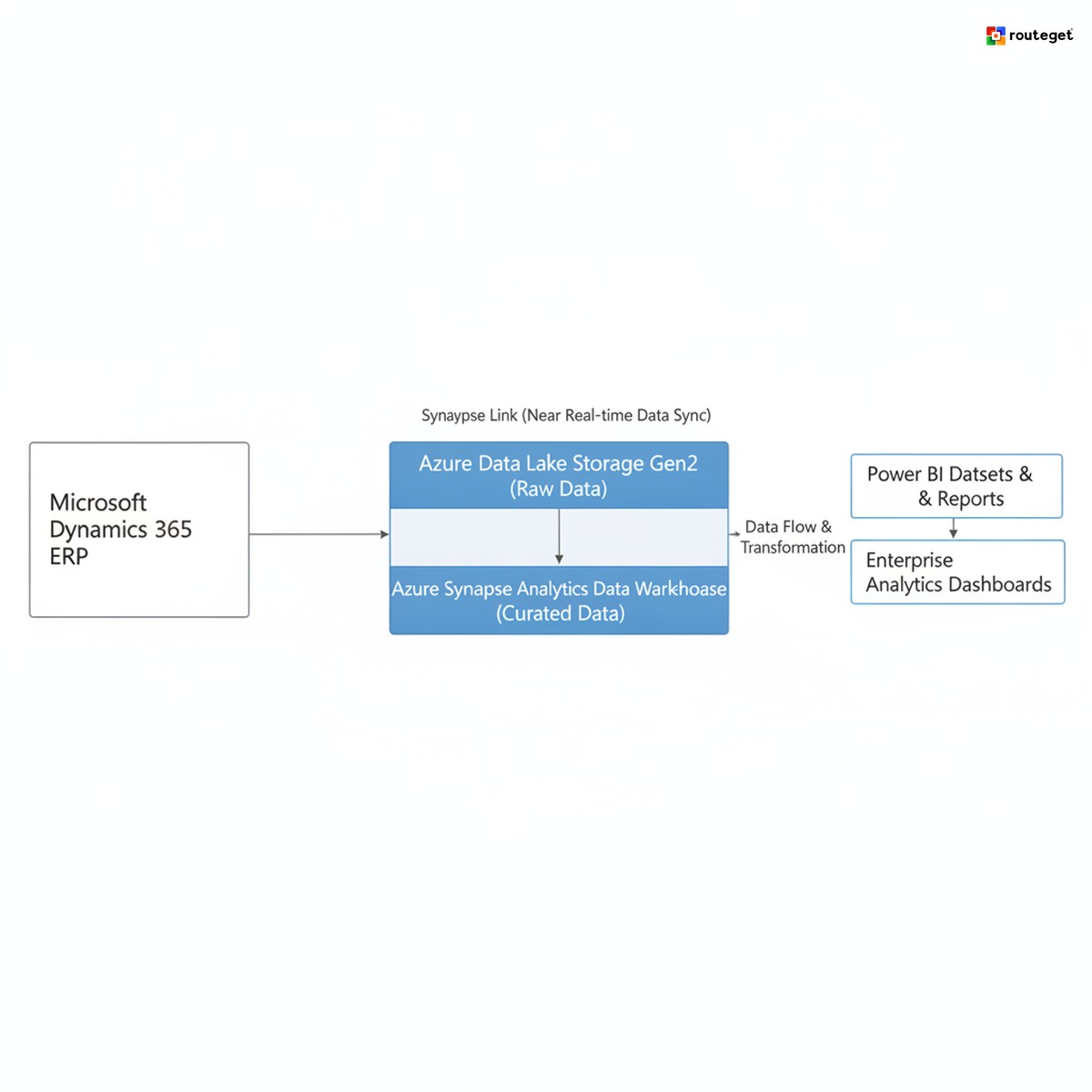
Option B is to keep Power BI but layer on a data warehouse. Implement Synapse Link to create a copy of Dynamics 365 data in Azure Data Lake Storage, configure incremental refresh, and rebuild Power BI models to query the data warehouse instead of production. This is lower-impact than Option A but still requires rebuilding every model, testing, and user retraining. Cost: $150,000 to $300,000.
Option C is to do nothing. Accept the performance issues, audit trail gaps, and transformation logic scattered across Power BI DAX. This is not actually an option for organizations subject to audit or compliance reporting, but it is sometimes chosen by organizations that do not realize the risk until too late.
The common thread: organizations end up implementing the same analytics architecture they could have scoped in month 1, but they do it in month 5 or month 6, after investing hundreds of thousands of dollars in an interim architecture they now have to rework.
What an Analytics-First Approach Actually Looks Like
This is not an argument for building a data warehouse on day one, or for treating analytics as phase 1 while business processes are still being configured.
An analytics-first approach in Dynamics 365 means making architecture decisions before detailed configuration starts. Determine early: Will you need real-time data sync from Dynamics 365 (Synapse Link)? Will you need to combine Dynamics 365 data with non-ERP sources (CRM data, supply chain planning tools, external market data)? Do your compliance and regulatory requirements mandate an immutable audit trail? If yes to any of these, design the data architecture before configuring modules.
It means reserving capacity in the project plan for analytics architecture. Not for full BI build-out, but for defining the data model, designing the ETL flow, and establishing naming conventions and transformation rules. This is a 4-to-6-week effort, not a phase 2 surprise.
It means implementing a minimal viable analytics infrastructure alongside ERP configuration. This typically means Synapse Link configured to pull Dynamics 365 data into a data lake in real time or near-real time, basic ETL logic to flatten and standardize the raw data, and a simple semantic layer (Power BI or similar) that consumes the standardized data model. This is not full BI—it is the scaffolding on which BI gets built.
It means documenting and version-controlling the business logic. Consolidation rules, currency conversions, tax calculations, intercompany eliminations—define them once, implement them in the data layer (SQL, Kusto, or whatever your platform uses), and version control them alongside your ERP configuration. This prevents logic drift and makes audits simpler.
The upfront cost is real: 2-to-4 additional weeks in planning, 1-to-2 additional team members (data architect, analytics engineer) in the deployment phase, and incremental Microsoft licensing (Synapse Link or Fabric). Total add-on cost: $80,000 to $150,000.
The payback happens immediately. By month 3, the organization has audit-grade data, performance is not degraded, and new reports can be built without breaking existing ones. By month 12, the organization has avoided the $200,000-to-$500,000 rework project that their “phase 2” peers are now undertaking.
The India Dimension: Compliance Reporting Complexity
Organizations implementing Dynamics 365 Finance in India face an additional complication. GST compliance reporting, RBI-mandated data retention for financial institutions, SEBI filing requirements for listed companies, and IND-AS consolidation rules all impose structure on data that cannot be retrofitted.
A GST 30-day e-invoice requirement is a good example. When an invoice is submitted to the GST portal, the exact data—amount, tax amount, tax rate, date—becomes immutable. A month later, if someone corrects a GL entry in Dynamics 365 that touched that invoice, the reported figure no longer matches the invoice submitted. Organizations need an immutable record of what was reported when. This is only possible if the analytics architecture captures and preserves that immutability from the start. Retrofitting it is complex and expensive. Organizations that defer analytics architecture end up building compliance reporting as a separate, parallel solution to their BI layer, doubling the maintenance burden.
Building for Both Today and Tomorrow
If your Dynamics 365 implementation is exhibiting any of these patterns, you are likely building analytics debt: Power BI reports are taking visibly longer to refresh (direct query hitting contention or query timeouts); calculations for the same metric differ between reports (the revenue number in the P&L report differs from the revenue metric in the sales dashboard); your audit team is asking for a “report of what was reported” (they need an immutable record of figures from past periods); new BI requests are slow because logic needs to be added to five different places (DAX measures, calculated columns, filters scattered everywhere); no one can fully explain why a given number is calculated the way it is (the logic lives in Power BI DAX, not in documented code). If three or more of these apply, you are in debt and will need a proper architecture conversation.
For organizations mid-implementation: commission a brief architecture review (2-to-3 weeks), then phase the analytics layer in parallel with remaining ERP configuration. Decide on Synapse Link versus Fabric versus custom ETL based on your regulatory and performance requirements. For organizations beginning new implementations: treat analytics architecture as a core design decision, not a phase 2 convenience. The upfront cost is low; the retrofit cost is high.
How Routeget Structures Analytics Architecture Into Dynamics 365 Rollouts
Most Dynamics 365 implementations Routeget audits or joins mid-flight are already on the retrofit trajectory. The organization has Power BI queries running against production, performance is degrading, audit is asking questions, and someone finally says: “Maybe we need a data warehouse architecture.”
Routeget’s approach starts by front-loading this conversation. During the design phase, before configuration deepens, Routeget’s architects spend 2-to-3 weeks defining the analytics data model alongside the ERP configuration. This includes scoping Synapse Link integration (or Microsoft Fabric, depending on the timeline and architecture preference), identifying which Dynamics 365 entities and fields will feed the data lake, and designing the transformation logic that turns raw Dynamics 365 data into a reconcilable, audit-grade semantic layer.
For organizations subject to India’s GST, IND-AS, or RBI requirements, this architecture work includes immutability patterns and audit-trail design from the start. The compliance reporting structure is built into the data model, not bolted on afterward.
During deployment, Routeget’s data engineers implement Synapse Link alongside the ERP go-live. By day 30, the organization has both live ERP processes and a running data pipeline pulling production Dynamics 365 data into the data lake. Basic Power BI semantic models are built to this architecture, so the first reporting wave uses clean, centralized logic, not scattered DAX calculations.
The result: organizations avoid the month 4 or 5 reckoning where someone realizes analytics architecture is missing. Instead, they have built the scaffolding that scales as their BI needs grow. Adding a new dashboard, consolidation rule, or compliance report becomes a data model change, not a rework of existing reports.
—
#DynamicsFinanceOps #AnalyticsArchitecture #Synapse #PowerBI #DataWarehouse #ERPImplementation #DataGovernance #GST #EnterpriseERP #Dynamics365FinanceOperations
Amarnath Gupta is a visionary digital transformation leader with over two decades of experience guiding Fortune 500 organizations through enterprise-wide innovation. He has built and scaled Microsoft Dynamics 365 practices into $7.5 million revenue engines, rescued high-risk global implementations, and delivered 35 percent operational efficiency gains, 40 percent faster go-lives, and 30 percent cost optimizations across industries from manufacturing to healthcare and construction.
His passion for marrying deep technical command in Dynamics 365, Azure AI/ML, and Power Platform with strategic P&L governance has spawned proprietary IP solutions like JewelPro™ and OmniClaim Sentinel™. A catalyst for modern AMS frameworks, he leverages predictive KQL analytics and intelligent support automation to slash incident resolution times by 30 percent and cut costs by up to 30 percent.
Amarnath writes about practical strategies for data-driven decision making, end-to-end ERP/CRM implementation best practices, and the future of cloud-native architectures. His work empowers readers to transform underperforming units into high-growth engines while embedding Agile/DevOps and Zero Trust security into every layer.
- Microsoft Dynamics 365 F&O, CE, Commerce, Field Services
- Azure AI/ML integration and predictive analytics
- Enterprise Application Maintenance & Support (AMS)
- Agile/DevOps delivery and operational excellence
- Data modernization and cloud transformation

Amarnath Gupta is a visionary digital transformation leader with over two decades of experience guiding Fortune 500 organizations through enterprise-wide innovation. He has built and scaled Microsoft Dynamics 365 practices into $7.5 million revenue engines, rescued high-risk global implementations, and delivered 35 percent operational efficiency gains, 40 percent faster go-lives, and 30 percent cost optimizations across industries from manufacturing to healthcare and construction.
His passion for marrying deep technical command in Dynamics 365, Azure AI/ML, and Power Platform with strategic P&L governance has spawned proprietary IP solutions like JewelPro™ and OmniClaim Sentinel™. A catalyst for modern AMS frameworks, he leverages predictive KQL analytics and intelligent support automation to slash incident resolution times by 30 percent and cut costs by up to 30 percent.
Amarnath writes about practical strategies for data-driven decision making, end-to-end ERP/CRM implementation best practices, and the future of cloud-native architectures. His work empowers readers to transform underperforming units into high-growth engines while embedding Agile/DevOps and Zero Trust security into every layer.
- Microsoft Dynamics 365 F&O, CE, Commerce, Field Services
- Azure AI/ML integration and predictive analytics
- Enterprise Application Maintenance & Support (AMS)
- Agile/DevOps delivery and operational excellence
- Data modernization and cloud transformation